
Sarvam AI has gained real traction as a major India-based and India-focused AI provider. I can understand why people see it this way after going through their documentation and cookbook. Rather than treating Indian languages as supplemental learning material, Sarvam AI built its services and models from the ground up using Indian languages. I want to break down my experience in a simple Q&A format, and also get into one concrete use case and demonstrate my implementation of how I used transcription and translation for videos.
The first and foremost question that comes to everyone is, ‘Why Sarvam AI’? The short answer, for me, is that it understands Indian languages natively rather than translating everything through English first. I have often wondered why only select videos on Netflix, Amazon Prime, or even YouTube have closed captions and audio transcripts for a few select languages when modern LLMs can render these services out of the box. I think Sarvan AI is well-suited for this specific use case, as it provides translation and transcription in a very native Indian-language way.
So the next question is, what do I mean by a ‘very native Indian language way’? The way people in India actually speak today is not pure Tamil, Telugu, or Hindi. Language has naturally evolved to blend English words and phrases into the sentences people speak without anyone even noticing. This doesn’t mean the language is broken, but this is how it has evolved over time in modern usage.
How does Sarvam AI handle mixed languages? Most translation systems don’t know how to handle mixed words from various languages, and India has been in this situation. You can see a Tamil person using a Tamil word, an English word, and a local word from Telugu to frame a sentence. Translation systems translate everything into English or force everything into pure native languages, stripping out the natural mixing and making the output feel very stiff and formal, and it just doesn’t fit how the person would actually speak. I see Sarvam AI’s strength is that it stays in a mixed state rather than replacing words word by word in the target language.
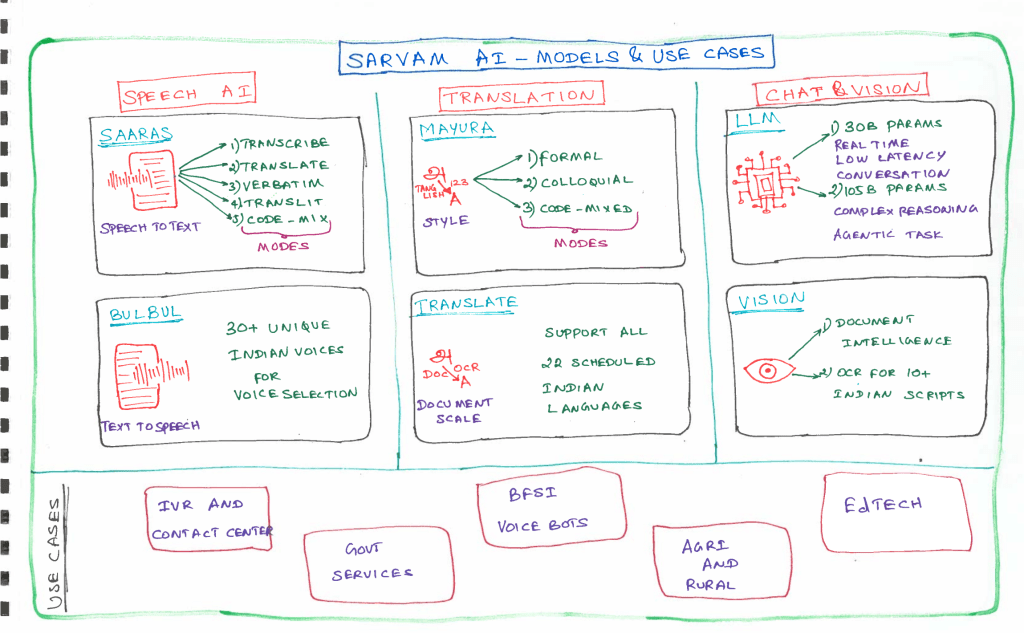
What are the offerings from Sarvam AI? At a high level, Sarvam AI provides five core building blocks.
1. Speech-to-text – Turn spoken audio into text with multiple output styles.
2. Text-to-speech – Naturally sounding voices across Indian languages and accents.
3. Chat completion – Conversational and reasoning models.
4. Text processing – Translation, formatting, and downstream text transformation.
5. Documentation digitization – Extract structured text from scanned or image-based documents.
At the core of all services, Sarvam AI prioritizes a local, evolved, Indian language-first approach.
How is Sarvam AI different? It provides translation and transcription in the chat that handle India-specific language patterns as the default, not the edge case. This means,
1. It can transcribe and translate into multiple output formats, so you can get text in Roman script, native script, or spoken-style rendering, depending on what your downstream system needs.
2. It handles code mixing the way people in India actually speak, blending languages mid-sentence rather than forcing a single clean language in or out.
3. It supports downstream systems that only accept Latin script, so your system built for English text can still consume Sarvam’s output for Tamil, Telugu, Malayalam, or other Indian languages.
This combination makes it useful for building chat agents that feel natural, transcribe conversations reliably, and feed clean, translated text into pipelines that were never designed with Indian languages in mind.
When should you use Sarvam AI? Three scenarios come to mind.
1. You are building something with a regulatory or product reason to keep data and language India-specific.
2. The user speaks Indian languages and mixes languages within a sentence.
3. You need voice output that sounds like it belongs to an Indian accent or persona.
How to use it? It is no different from using a model hosted by any hyperscaler. We should get an API key. We can install one of the client libraries and start making calls to their endpoints. If you have used OpenAI, Anthropic, or the Google API before, the mental model is the same.
What are the different ways to access Sarvam AI? There are three ways.
1. API – this is for on-demand requests. It is used when a request fails in the whole pipeline and is called on an as-needed basis.
2. Web Socket (streaming) – for live video, live calls, or live broadcasts. A persistent connection stays open, and audio flows continuously. A final transcript or translation segment is streamed back out while the event is still happening. This is the only option when there is nothing to send until someone actually speaks.
3. Batch – for a file that already exists in full. You send the whole file once and get back the complete transcript or translation with proper timestamps. Think of it like a job with no urgency that runs to completion.
What stood out? Features I haven’t seen anywhere.
1. Speaker diarization up to 20 speakers – It can detect and label up to 20 distinct speakers, even when everyone was using the same microphone.
2. Saara’s five output modes – It doesn’t just give you one flavor of transcript you can choose from but provides transcribe, translate, verbatim, translit, and code mix, depending upon what you actually need for your use case.
3. Bulbul’s character voices – It gives multiple speaker voices and control over how speech comes out rather than one generic voice. For me, what stood out was the character-based framing they had – ‘Varun’ voice for thriller drama, or suspense content specifically.
4. Mayura’s script control and translation style – The English – Indian language translation model doesn’t just translate, it lets you choose the form of the output, like Roman script or native script or a spoken style rendering, and also a translation style that includes formal, colloquial, or code-mixed.
5. Wiki grounding for factual accuracy – It is a lightweight grounded accuracy against Wikipedia for confidentiality.
6. Seed-based reproducibility – For regression testing or demos, setting a seed gets you the same output every time.
7. Present penalty – Pushes the model toward a new topic instead of repeating itself.
8. Repetition frequency penalty – Reduces repeated words or phrases.
9. Finally, the two reasoning models – Sarvam 30B for fast chat-style responses and Sarvam 105B for deeper, more agent-like multi-step work.
Now let’s put our learning to use in a use case.
Use case – Taking the live video and producing live transcription and translation by using Sarvam AI APIs.
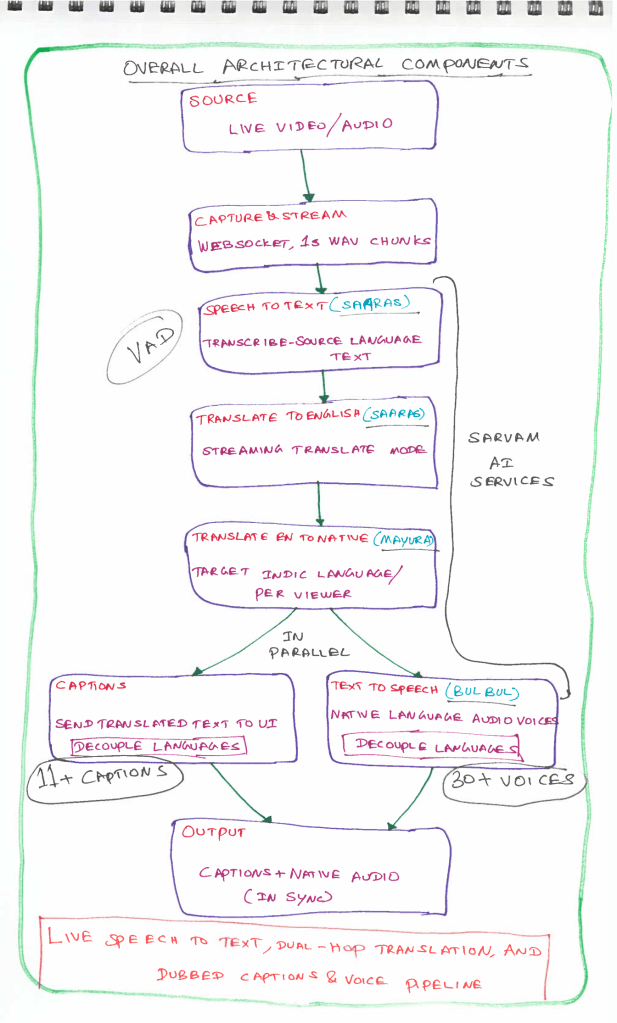
Pipeline – The browser captures audio from the live video source, encodes it to 16 kHz Mono WAV, and emits roughly 1-second chunks over a Socket.IO connection to a backend server. That server doesn’t treat each chunk as an isolated translation job. Rather, it forwards the continuous audio stream into two persistent WebSocket connections. The first runs in transcribe mode, and the second runs in translate mode. Sarvam AI has its own voice activity detection (VAD) and monitors the continuous audio for actual speech boundaries, such as a full sentence or a natural pause. This is completely independent of how often the browser sends the chunks. Once the VAD determines that an utterance is complete, the inferences run and emit the finalized segment back through the socket.
Where does the translation get harder than transcription? – Sarvam’s streaming translate mode is fixed as Indic languages to English. There is no multi-target language translation. To support several output languages at once, the finalized English text segment gets forwarded to a separate text translation call for the target language. It runs concurrently rather than one after the other. Some times few languages take more time to translate and not every language emits the output at the same time.
What is the bottleneck of the fan-out and merge architecture? How can we mitigate this? – When the user requests the translation, then waiting for every language translation and then releasing it as one bundle result makes the slowest language the bottleneck for every viewer, including the ones who might have wanted only English. The fix is to decouple emission per language entirely. Show English the moment it’s ready and attach each additional language as its own call resolves rather than waiting for all of them. Also, we can add a hard timeout for language calls with a graceful fallback to English. If a language is consistently slow rather than occasionally, that’s a signal to pull it out of the live path and handle it as a slower batch pass instead.
Where do WebSocket, batch, and a single API call each fit? For the live event itself, the socket is the only option. The audio doesn’t exist until it’s spoken. If the goal is to generate captions for a pre-recorded video before uploading it to YouTube, it’s a batch job. Send the whole file once, get back a full transcript and all target-language translations together. Here, there’s no timeout pressure since nobody is watching live. A single API call handles the on-demand edge case in both paths. Patching one mistranslated line, adding one extra language after the fact, or backfilling a segment that timed out during the live run.
Sarvam AI’s core pitch is that its voice and language AI treats Indian languages, scripts, and code mixing as the default rather than an add-on. It is primarily made for Indian use cases.
Share your learning and implementation of Sarvam AI.
Happy learning!

