
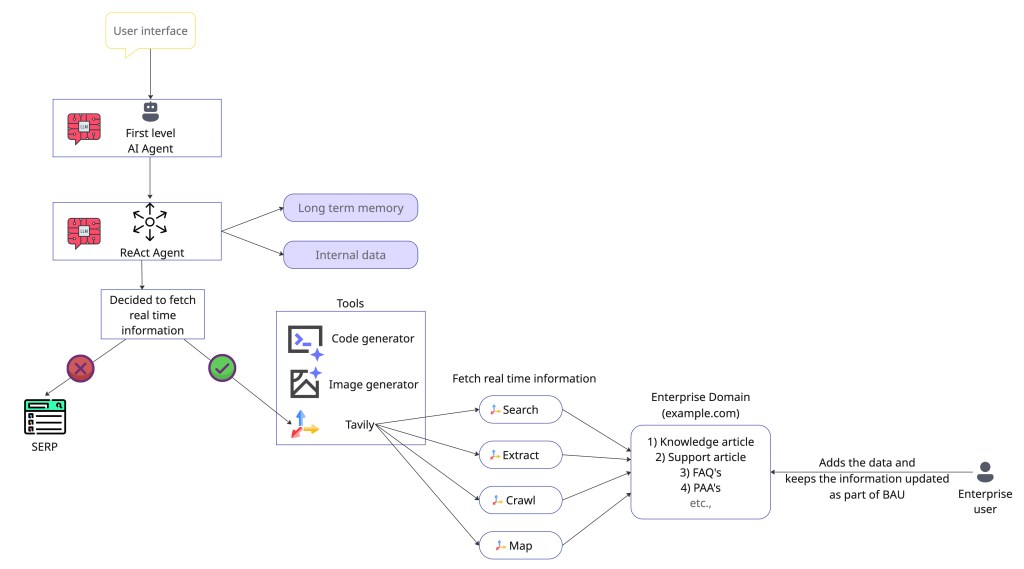
An agentic search tool is like the eyes and ears of the Agentic AI. This helps in obtaining real-time data from the web when the LLMs lack the necessary information. LLMs, in most cases, have a knowledge cut off date and lack access to real time information. Agentic searching tools help solve the gap here. When the AI agent determines that it lacks the necessary information, it can request tools like Tavily to search and extract real-time information.
How is agentic search different from regular search?
The traditional search engine result pages (SERP) returns a long list of titles, images, and URLs which are designed for humans to navigate through. However, the AI agents need a structured set of data (the actual content itself) for the LLMs to process and provide the final input. This is time efficient because the LLMs are not doing the extra work of parsing the content from the SERP. Rather with agentic search tools, the LLMs get the direct content from the search tool that can be easily processed but still holding the source of truth to the content that was shared with the LLMs. This ensures trust in the LLM.
How is Tavily search different from SERP?
The challenges with the traditional SERP are –
1) Paid results – This sometimes adds no context to the relevant search. This is because most search engines are designed for commerce and not for informational relevance.
2) Complex search results that take extra efforts for the LLMs to process and filter the unstructured information, which is inefficient, error-prone, and adds latency to the query.
What is the role, and where does the agentic search fit in the RAG pipeline of an AI agent?
We now know that Agentic search fills in the gap when the LLM determines it doesn’t have relevant information. Below are the high-level steps involved in the entire process.
1. Intent recognition – For example, the user submits the following query – ‘What are the latest developments in AI and what are the top 5 AI companies?’.
2. Tool decision – LLM, in this case, recognizes 2 intents – a) It needs the latest information, and b) It has to search the web.
3. Agentic search – This is where Tavily comes into play. LLM generates the structured query for Tavily.
Ex –
{
"tool_name": "tavily_search",
"arguments": {
"query": "latest developments in AI and top companies",
"max_results": 5,
"search_depth": "advanced"
}
}
4. Final response generation by LLM – Tavily search API returns the relevant and highly precise data snippets for the LLM to generate the final answer for the query.
Why is Tavily easy to use?
1. Simple API –
Traditional search for an AI agent is a multi-stage workflow that looks like the one below – Traditional Search ⟹ SERP API -> Crawl URL -> Scrape HTML -> Clean Content -> LLM Input
Tavily does all the heavy lifting and offers a straightforward API call like the below – Agentic Search ⟹ Tavily API Call -> LLM-Ready, Clean Context
2. Out of the box integration with Agent frameworks like Langchain, LlamaIndex. And as per the Tavily documentation, REST APIs and simple Python and JavaScript SDKs also make the usage simple and less time consuming.
What is the advantage of using a agentic search tool like Tavily?
There are 2 major advantages –
1. Maximize the token efficiency and content cleaning – Every LLM has an upper limit on the information it can process at a time (context window). With the SERP, we get lot of unwanted data as content that some times exceeds the context window. Tavily API provides a clean content by already filtering unwanted HTML, CSS, and many other forms of irrelevant data. The clean content is the actual input needed by the LLM.
2. Fine grained search parameters – Provides options to fine tune the search with parameters for time range filtering, including/excluding a domain, including/excluding the images, and so on.
What APIs are available from Tavily?
There are 4 major APIs available from Tavily –
1) Search API – Returns the results in a clean format with a snippet and answer (generated by LLM) for the search query. The API provides more control on the search by setting boundaries on the search query with various request parameters. The search query is any data that we have to look at the internet to get the results for.
Request parameters –
| Parameter | Type | Notes | Status |
| Authorization | string (Header) | Bearer token containing the API key. | MANDATORY |
| query | string (Body) | The search query text. | MANDATORY |
| auto_parameters | boolean | Default: false. Enables automatic parameter configuration. | OPTIONAL |
| topic | enum<string> | Default: general. Options: general, news, finance. | OPTIONAL |
| search_depth | enum<string> | Default: basic. Options: basic, advanced. | OPTIONAL |
| chunks_per_source | integer | Default: 3. Max content chunks per source (only with advanced search depth). | OPTIONAL |
| max_results | integer | Default: 5. Max number of search results (Range 0-20). | OPTIONAL |
| time_range | enum<string> | Filter results by publish date (e.g., day, week, month, year). | OPTIONAL |
| days | integer | Default: 7. Number of days back to include (only if topic is news). | OPTIONAL |
| start_date | string | YYYY-MM-DD format. Returns results after this date. | OPTIONAL |
| end_date | string | YYYY-MM-DD format. Returns results before this date. | OPTIONAL |
| include_answer | boolean/enum<string> | Default: false. Includes LLM-generated answer. Options: true, basic, advanced. | OPTIONAL |
| include_raw_content | boolean/enum<string> | Default: false. Includes cleaned HTML content. Options: true, markdown, text. | OPTIONAL |
| include_images | boolean | Default: false. Performs an image search. | OPTIONAL |
| include_image_descriptions | boolean | Default: false. Adds descriptions to images (requires include_images: true). | OPTIONAL |
| include_favicon | boolean | Default: false. Includes the favicon URL for each result. | OPTIONAL |
| include_domains | string[] | List of domains to specifically include. | OPTIONAL |
| exclude_domains | string[] | List of domains to specifically exclude. | OPTIONAL |
| country | enum<string> | Boosts results from a specific country (only if topic is general). | OPTIONAL |
Response parameters –
| Parameter | Type | Description | Status |
| query | string | The search query that was executed. | MANDATORY |
| response_time | number | Time taken to complete the request (in seconds). | MANDATORY |
| results | object[] | A list of sorted search results. | MANDATORY |
| title | string | The title of the search result. | MANDATORY |
| url | string | The URL of the search result. | MANDATORY |
| content | string | A short description (snippet) of the search result. | MANDATORY |
| score | number | The relevance score. | MANDATORY |
| raw_content | string | Included only if include_raw_content was requested. | OPTIONAL (Conditional) |
| favicon | string | Included only if include_favicon was requested. | OPTIONAL (Conditional) |
| images | object[] | List of query-related images (can be an empty array []). | MANDATORY |
| url | string | The URL of the image. | MANDATORY |
| description | string | Included only if include_image_descriptions was requested. | OPTIONAL (Conditional) |
| answer | string | An LLM-generated answer. Included only if include_answer was requested. | MANDATORY (Conditional) |
| auto_parameters | object | A dictionary of parameters automatically selected by Tavily. Included only if auto\_parameters: true was sent in the request. | OPTIONAL (Conditional) |
| request_id | string | A unique identifier for the request. | OPTIONAL |
2) Extract API – Returns the raw content of the entire web page for the provided URL. Multiple URL’s can be passed in the request, and the API returns the raw content of each web page in a clean format.
Request parameters –
| Parameter | Type | Notes | Status |
| Authorization | string (Header) | Bearer token containing the API key. | MANDATORY |
| urls | string or string[] (Body) | The URL(s) to extract content from. | MANDATORY |
| include_images | boolean | Default: false. Includes a list of image URLs extracted from the page. | OPTIONAL |
| include_favicon | boolean | Default: false. Includes the favicon URL for each result. | OPTIONAL |
| extract_depth | enum<string> | Default: basic. Options: basic, advanced. | OPTIONAL |
| format | enum<string> | Default: markdown. Format for the extracted content. Options: markdown, text. | OPTIONAL |
| timeout | number | Max time in seconds to wait for extraction (Range 1.0 to 60.0). | OPTIONAL |
Response parameters –
| Parameter | Type | Description | Status |
| results | object[] | A list of successfully extracted content from the provided URLs. | MANDATORY |
| url | string | The URL the content was extracted from. | MANDATORY |
| raw_content | string | The full, cleaned content extracted from the page. | MANDATORY |
| favicon | string | The favicon URL for the result. | OPTIONAL (Conditional) |
| images | string[] | A list of image URLs. Included only if include_images: true was requested. | OPTIONAL (Conditional) |
| failed_results | object[] | A list of URLs that could not be processed. | MANDATORY |
| url | string | The URL that failed. | MANDATORY |
| error | string | An error message explaining the failure. | MANDATORY |
| response_time | number | Time taken to complete the request (in seconds). | MANDATORY |
| request_id | string | A unique identifier for the request. | OPTIONAL |
3) Crawl API – Based on the provided instruction, the API crawls through the specified domain and fetches the raw content on the successfully crawled URLs.
Request parameters –
| Parameter | Type | Notes | Status |
| Authorization | string (Header) | Bearer token containing the API key. | MANDATORY |
| url | string (Body) | The root URL where the crawl begins. | MANDATORY |
| instructions | string | Natural language instructions for the crawler’s goal (increases cost if specified). | OPTIONAL |
| max_depth | integer | Default: 1. Maximum number of link “hops” from the base URL (Range ≥1). | OPTIONAL |
| max_breadth | integer | Default: 20. Maximum number of links to follow per page (Range ≥1). | OPTIONAL |
| limit | integer | Default: 50. Total maximum number of links the crawler will process (Range ≥1). | OPTIONAL |
| select_paths | string[] | Regex patterns to include only URLs matching specific path patterns. | OPTIONAL |
| select_domains | string[] | Regex patterns to limit crawling to specific domains or subdomains. | OPTIONAL |
| exclude_paths | string[] | Regex patterns to exclude URLs matching specific path patterns. | OPTIONAL |
| exclude_domains | string[] | Regex patterns to exclude specific domains or subdomains. | OPTIONAL |
| allow_external | boolean | Default: true. Whether to include external domain links in the final results. | OPTIONAL |
| include_images | boolean | Default: false. Whether to include images in the crawl results. | OPTIONAL |
| extract_depth | enum<string> | Default: basic. Extraction depth. Options: basic, advanced. | OPTIONAL |
| format | enum<string> | Default: markdown. Format for the extracted content. Options: markdown, text. | OPTIONAL |
| include_favicon | boolean | Default: false. Whether to include the favicon URL for each result. | OPTIONAL |
Response parameters –
| Parameter | Type | Description | Status |
| base_url | string | The root URL that was used for the crawl. | MANDATORY |
| results | object[] | A list of extracted content from the successfully crawled URLs. | MANDATORY |
| url | string | The URL of the crawled page. | MANDATORY |
| raw_content | string | The full, cleaned content extracted from the page. | MANDATORY |
| favicon | string | The favicon URL for the result. | OPTIONAL (Conditional) |
| images | string[] | A list of image URLs. Included only if include_images: true was requested. | OPTIONAL (Conditional) |
| failed_results | object[] | A list of URLs that could not be processed. | MANDATORY |
| url | string | The URL that failed. | MANDATORY |
| error | string | An error message explaining the failure. | MANDATORY |
| response_time | number | Time taken to complete the request (in seconds). | MANDATORY |
| request_id | string | A unique identifier for the request. | OPTIONAL |
4) Map API – Constructs the list of all the URLs based on the instructions and other parameters that are set with the request. This helps in building a comprehensive site maps.
Request parameters –
| Parameter | Type | Notes | Status |
| Authorization | string (Header) | Bearer token containing the API key. | MANDATORY |
| url | string (Body) | The root URL where the mapping begins. | MANDATORY |
| instructions | string | Natural language instructions for the crawler’s goal (increases cost if specified). | OPTIONAL |
| max_depth | integer | Default: 1. Maximum number of link “hops” from the base URL (Range ≥1). | OPTIONAL |
| max_breadth | integer | Default: 20. Maximum number of links to follow per page (Range ≥1). | OPTIONAL |
| limit | integer | Default: 50. Total maximum number of links the crawler will process before stopping (Range ≥1). | OPTIONAL |
| select_paths | string[] | Regex patterns to include only URLs matching specific path patterns. | OPTIONAL |
| select_domains | string[] | Regex patterns to limit mapping to specific domains or subdomains. | OPTIONAL |
| exclude_paths | string[] | Regex patterns to exclude URLs matching specific path patterns. | OPTIONAL |
| exclude_domains | string[] | Regex patterns to exclude specific domains or subdomains. | OPTIONAL |
| allow_external | boolean | Default: true. Whether to include external domain links in the final results list. | OPTIONAL |
Response parameters –
| Parameter | Type | Description | Status |
| base_url | string | The base URL that was used for the mapping. | MANDATORY |
| results | string[] | A list of all URLs discovered during the website mapping. | MANDATORY |
| response_time | number | Time taken to complete the request (in seconds). | MANDATORY |
| request_id | string | A unique identifier for the request. | OPTIONAL |
From the enterprise perspective, today enterprises have plenty of support articles in the form of knowledge base, FAQ, People also ask, etc. All these mostly live on a domain that the enterprises manage and control. These documents can be funneled via Tavily API (Search, Extract, and Crawl) to the agent for the final responses. This provides a quicker AI adoption at an enterprise with lower risk of providing wrong information or hallucination.
Sharing a sample project that was developed using lovable.dev to build a search engine like Google using Tavily search API to demonstrate how handy and quick is to use the Tavily API to get the needed search result in a very clean format – https://github.com/shankar2686/safebrowse.
Share your experience utilizing Search APIs for your AI agents.
Happy learning!
 Shankar's Blog