
AWS Bedrock is a powerful serverless platform that provides a comprehensive framework for building generative AI applications from scratch. It allows you to choose, customize, and consume pre-trained foundation models (FMs) from leading AI providers like AI21 Labs, Amazon, Anthropic, Cohere, Meta, Mistral AI, and Stability AI. This means you can leverage cutting-edge AI capabilities without the heavy lifting of training models yourself.
Who can use AWS Bedrock?
Bedrock is designed with accessibility in mind. You don’t need to be a machine learning expert to harness its power. With minimal programming skills, you can start building generative AI applications. Bedrock offers both a user-friendly console interface and a robust CLI, giving you the flexibility to work in the way that suits you best.
Bedrock vs. SageMaker: Choosing the Right Tool
It’s important to understand how Bedrock differs from Amazon SageMaker. While both services empower you to build AI solutions, they cater to different needs and expertise levels.
- SageMaker: A comprehensive machine learning platform that provides an IDE for building, training, and deploying models at scale. It offers extensive control over model customization and is ideal for users with deeper machine learning expertise who require fine-grained control over the training process.
- Bedrock: Focuses on simplifying the use of pre-trained FMs, making it easier for developers and businesses to quickly integrate AI capabilities into their applications without extensive machine learning knowledge.
In some cases, combining Bedrock and SageMaker can be a winning strategy. For example, you can use Bedrock to rapidly prototype an application with a pre-trained FM and then leverage SageMaker to further refine and optimize the model for peak performance.
Ways to Use Models in Bedrock
Bedrock offers three primary ways to work with models:
A) Foundational Models: Directly consume pre-trained FMs from various providers, choosing the best fit for your use case.
B) Imported Models: Import your own models by uploading them to Amazon S3 or importing them from Amazon SageMaker. This allows you to experiment with and deploy models you’ve developed elsewhere.
C) Custom Models: This is where Bedrock truly shines, enabling even those with minimal AI experience to customize models to their specific needs. Bedrock offers three powerful customization options:
1. Fine-tuning: A Personal Touch
Think of fine-tuning like giving your model a little extra coaching. You provide it with some labeled data, showing it exactly what you want it to learn. This helps the model get better at specific tasks and understand the nuances of your particular needs. It’s like giving a student extra practice problems to help them ace a test.
2. Distillation: Knowledge Transfer
Distillation is like having a senior expert (a large foundation model) teach a junior employee (a smaller model). The expert generates synthetic data, which is like a condensed version of its knowledge. The junior employee then learns from this synthetic data, becoming more specialized in your specific area of interest. This is a great way to get impressive performance from a smaller, more efficient model.
3. Continued Pre-training: Expanding Horizons
Continued pre-training is like sending your model to a conference to learn about the latest trends. You provide it with a lot of unlabeled data, exposing it to a wider range of information. This helps the model become more familiar with different types of inputs and broadens its overall understanding. It’s like giving your model a chance to explore and expand its knowledge base.
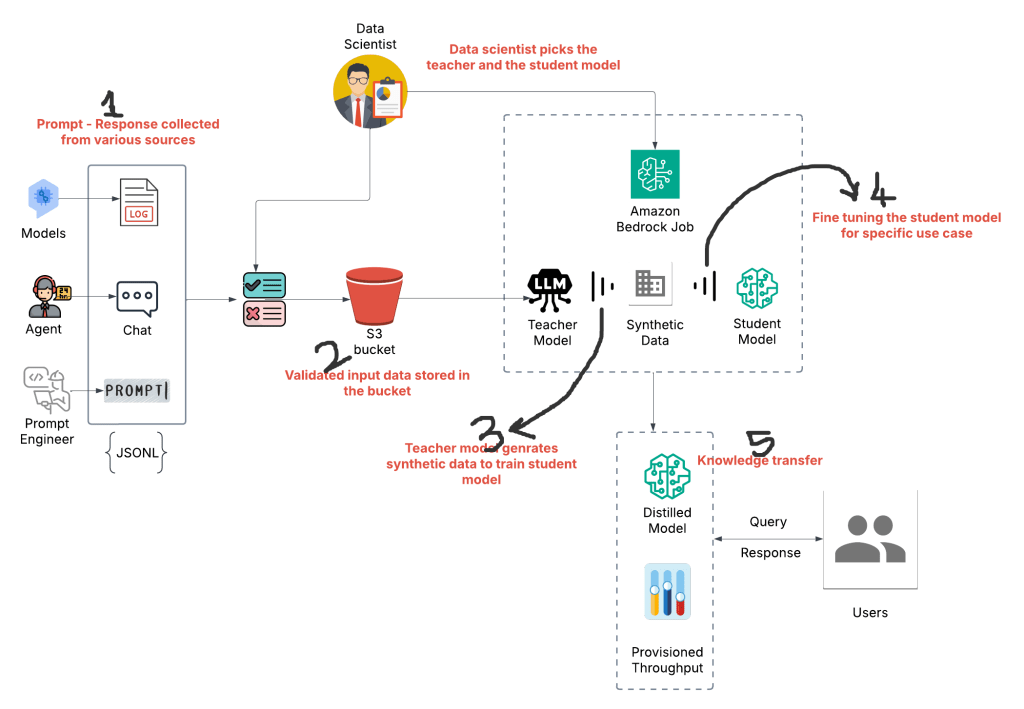
Below is the high level work flow of the distillation process ..
Diving Deeper into Distillation
Let’s take a closer look at distillation, a fascinating technique with significant advantages…
Before we start exploring distillation, take care of a couple of essential prerequisites.
1. Request Access to Foundation Models
First things first, you’ll need access to the foundation models (FMs) that Bedrock offers. Requesting access is easy, and it’s typically granted instantly. Simply browse the available FMs from different providers and request access to the ones that suits your needs. Keep in mind that just having access to the models won’t incur any costs – you’re only charged when you actually start using them.
2. Enable Model Invocation Logging
To get the most out of your distillation journey, it’s highly recommended to enable “Model invocation logging” in the Bedrock settings. This allows Bedrock to collect valuable metadata, requests, and responses for all your model interactions. This data can be a used for understanding how your models are performing, identifying areas for improvement, and troubleshooting any issues that may arise. Even better, these invocation logs can be used to fine-tune your distilled models, leading to even better performance.
Important Note: Model invocation logging doesn’t include logs for knowledge base (We will see about knowledge base soon) interactions. We’ll need to enable CloudWatch logs separately for each knowledge base you create.
Now, let’s explore the distillation process itself…
Distillation is a process of using a bigger model (Teacher) to teach a smaller model (Student). This is done by using synthetic data generated by the Teacher model to fine-tune the Student model for a specific use case.
Here’s how it works:
Provide Prompts or Prompt-Response Pairs: You provide the Teacher model with a set of prompts or prompt-response pairs relevant to your use case.
Generate Synthetic Data: The Teacher model generates responses to the prompts, creating a dataset of synthetic data. This data captures the Teacher model’s knowledge and expertise.
Fine-tune the Student Model: The Student model is then fine-tuned using the synthetic data generated by the Teacher model. This allows the Student model to learn from the Teacher model’s expertise and become specialized for your specific use case.
What is a teacher and student model?
1. The teacher model is an LLM from major providers like Google, Meta, Amazon, etc.
2. The student model is like a miniature version of the LLM with fewer parameters. (Parameters in AI models: These are the values that the model learns during training. They define the model’s behavior and are adjusted to minimize errors in predictions.
Also, the student and teacher model should be from the same family.
What is the goal of distillation?
The goal is to train the smaller model based on the data from the larger model to be more efficient and cost-effective.
How does the teacher model provide synthetic data to train the student model?
1. Directly upload to an S3 location: Provide an S3 location for prompts or prompt-response pairs to generate synthetic data for student model training. This is a JSONL format file that is utilized by the teacher model to generate the synthetic data.
2. Provide access to invocation logs: Provide permissions to access logs. Allow access to read prompts or prompt/responses from invocation logs. You can also determine if we have to provide access to read prompts only or read prompt-response pairs.
What type of output metrics is stored?
Amazon Bedrock uses the data you provide and if required, augments the dataset using data synthesis techniques to improve response generation. The augmented dataset is split into separate datasets to use for training and validation. Amazon Bedrock uses only the data in the training dataset to fine-tune the student model. The metrics generated from the training and validation datasets is stored in Amazon S3 bucket. Choose the Amazon S3 location where you want the training and validation metrics to be stored.
Provisioned Throughput
Once the distilled model is generated, you’ll have to purchase ‘Provisioned Throughput’ to run inferences against the model.
Provisioned Throughput lets you pay a fixed cost for a guaranteed higher throughput level for a base or custom model in Amazon Bedrock. You’re billed hourly, with the price varying based on:
- Chosen Model: Custom models cost the same as their base model.
- Number of Model Units (MUs): Each MU provides a specific throughput level, measured in input and output tokens processed per minute (consult your AWS account manager for specifics). More MUs = higher throughput.
- Commitment Duration: Longer commitments (1 or 6 months) offer discounted hourly rates compared to no commitment. Billing continues until you delete the provisioned throughput.
To use Provisioned Throughput:
1. Run model inference using the provisioned model.
2. Determine the required number of MUs and commitment duration.
3. Purchase Provisioned Throughput for your chosen model.
Running Model Inference
You can directly run model inference in the following ways:
1. AWS Management Console: Use any of the Amazon Bedrock Playgrounds to run inference using a user-friendly graphical interface.
2. Converse or ConverseStream API: Implement conversational applications.
3. InvokeModel or InvokeModelWithResponseStream API: Submit a single prompt.
Table comparing InvokeModel and Converse APIs –
| Feature | InvokeModel | Converse |
| Description | Runs inference using a specified model with a provided prompt and parameters. | Enables conversational interactions with models by sending requests and receiving responses. |
| Use Cases | Generating text, images, embeddings, and other single-turn tasks. | Building chatbots, virtual assistants, and other interactive applications. |
| Interaction | Single request-response cycle. | Multiple turns in a conversation, maintaining context. |
| Permissions | Requires bedrock:InvokeModel action permission. | Requires bedrock:InvokeModel permission. |
| Output | Direct output based on the prompt and parameters. | Output is part of an ongoing conversation, influenced by previous turns. |
| Streaming | Supported through InvokeModelWithResponseStream. | Supported through ConverseStream. |
| Input Parameters | modelId, contentType, accept, body, performanceConfigLatency. (Optional) guardrails | modelId, inferenceConfig, messages, performanceConfig. (Optional) guardrails |
| Error Handling | Returns error codes and messages. | Returns error codes and messages. |
| Customization | Limited to prompt engineering and parameter tuning. | Can be customized with system prompts and conversation history. |
| Model Compatibility | Compatible with a wide range of Bedrock models. | May have limitations depending on the model’s ability to handle conversational context. |
| Latency | Typically lower latency due to single request-response nature. | Potentially higher latency due to maintaining conversation context. |
| Token Usage | Charged for both input and output tokens. | Charged for tokens used in the entire conversation history. |
| Prompt Engineering | Focus on crafting effective prompts for specific tasks. | Focus on designing prompts that guide the conversation flow. |
| Example Scenario | Generating a product description from a set of attributes. | Having a chatbot conversation with a customer about their order. |
Production-grade AWS Bedrock Architecture

Share your thoughts on your learning experience with AWS Bedrock. Happy learning!
 Shankar's Blog